 Tiramisu
Quick Start
Getting Started with Tiramisu
Introduction
Tiramisu is an open source git-native memory system for AI coding agents. It stores curated memories as Markdown files inside your repositories, versioned alongside your code and reviewable in pull requests.
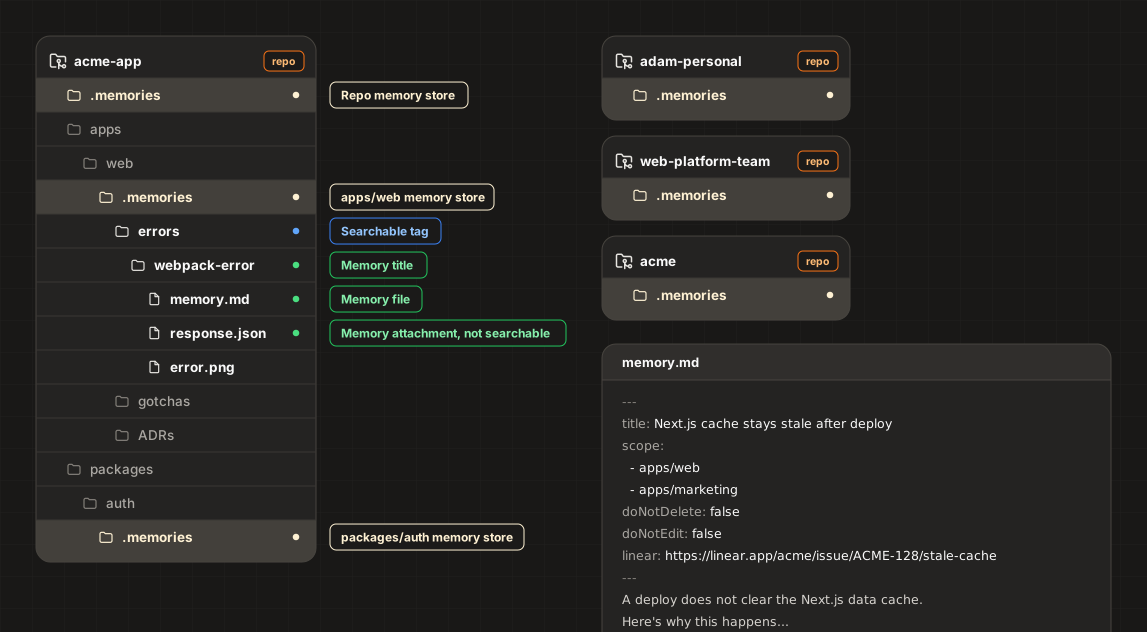
Features
- Hierarchical memory scoping
- Separate project, personal, team, and organization memories
- Easy pruning
- Custom memory schemas and writing rules
- Supports many languages and agent harnesses
Installation
Step 1: Configure pruning (Optional)
Upvotes and pruning reduce stale memories.
When a memory helps solve a task, it gets upvoted, which extends its lifespan. These events are stored in the database. On request, the agent can prune memories, meaning it reviews expired memories and suggests updates or deletions.
If you skip this step, upvotes are disabled, but the agent can still prune manually by searching your codebase to verify relevance.
Option A: Self-Hosted
Spin up a PostgreSQL database to store upvotes.
Option B: Tiramisu app (Coming Soon)
- ⚡ Cloud Database
- 📊 Dashboard
- 🤖 Automated Pruning PRs
Step 2: Separate project memories from personal, team, and/or organization memories (Optional)
This step is useful for teams. Solo devs can skip to Step 3.
- Create one repo per set of memories you want to keep separate (e.g. per team, one company-wide, one personal).
- Add each repo to your IDE and agent harness workspaces to "import" the memories.
- Install Tiramisu in each repo:
npx tiramisu@latest init --availableToWorkspaceStep 3: Install to project
Inside your project(s), run:
npx tiramisu@latest initManual Installation
- Install the
tiramisuCLI:
npm i -g tiramisu- Create
tiramisu.jsonat the root of your repository with the options you want:
{
  "version": 1,
  "availableToWorkspace": false,
  "prune": {
    "unvotedTtl": "90d",
    "humanUpvoteTtl": "180d",
    "agentUpvoteTtl": "90d",
    "databaseUrlCommand": "doppler secrets get TIRAMISU_DATABASE_URL --plain"
  }
}- Add the MCP tools:
Option 1: Using add-mcp
npx add-mcp "tiramisu mcp" -g --auto-approveOption 2: Manual installation
Refer to your agent's documentation on how to add a global MCP server.
Add:
tiramisu mcp- Add the memory writing skill:
npx skills add buildsip/tiramisu --global- VS Code / Cursor memory tab labels
{
  "workbench.editor.customLabels.patterns": {
    "**/.memories/**/memory.md": "${dirname}/memory.md"
  }
}- If you've enabled pruning, migrate your database using the drizzle schema from
tiramisu/packages/cli/migrations.